Edit, pause, end or delete a medication
Everything on a medication's page, from the directions to its history and supply.
Tap a medication in Meds to open its page.
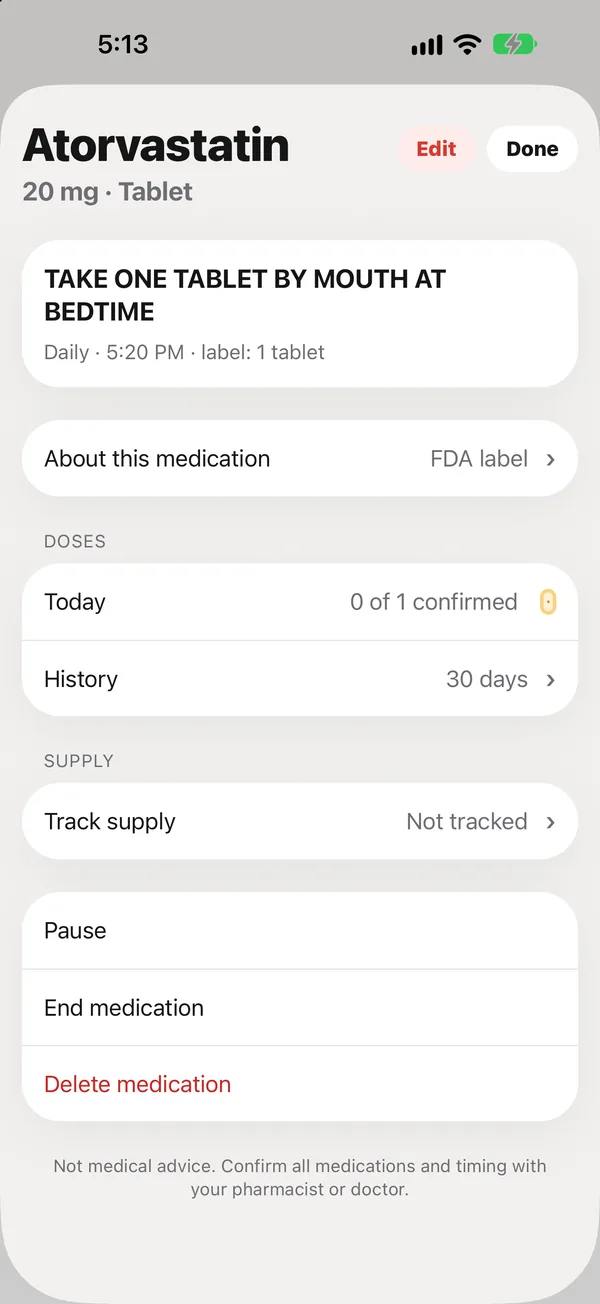
What’s on the page
- The directions as printed, with the schedule and label amount.
- About this medication: the FDA label in plain English. See Read the FDA label in plain English.
- Doses: today’s doses, and History for recent days.
- Supply: days left, the last fill, refills left, and Mark as refilled. See Track supply and refills.
- Prescriber and pharmacy, with a Call button for the pharmacy.
Edit
Tap Edit to change the name, strength, directions, schedule or anything else. Changes reach every phone in the circle.
Only the person who set up peaflow (the owner) can change medications. Family can see them and mark doses.
Pause
Pause stops reminders without losing anything, for example during a hospital stay. Resume it from the same page.
End
End medication when the doctor stops it. It leaves Today and the current list, and its history stays for the doctor PDF.
Delete
Delete medication removes it, for example if it was added by mistake. To keep the record, end it instead.
Did this answer your question?
Thanks for letting us know. If something's missing, email support@peaflow.com.