Invite family to help
Give a brother, sister or neighbor a code so they see today's doses and get told when one is missed.
The person who set up peaflow (the owner) invites everyone else.
Make a family code
- Open Care and tap Invite family.
- Under Family code, you’ll see a six-character code and a QR code.
- Tap Share to send it in a message, or let them scan the QR code with their iPhone camera.
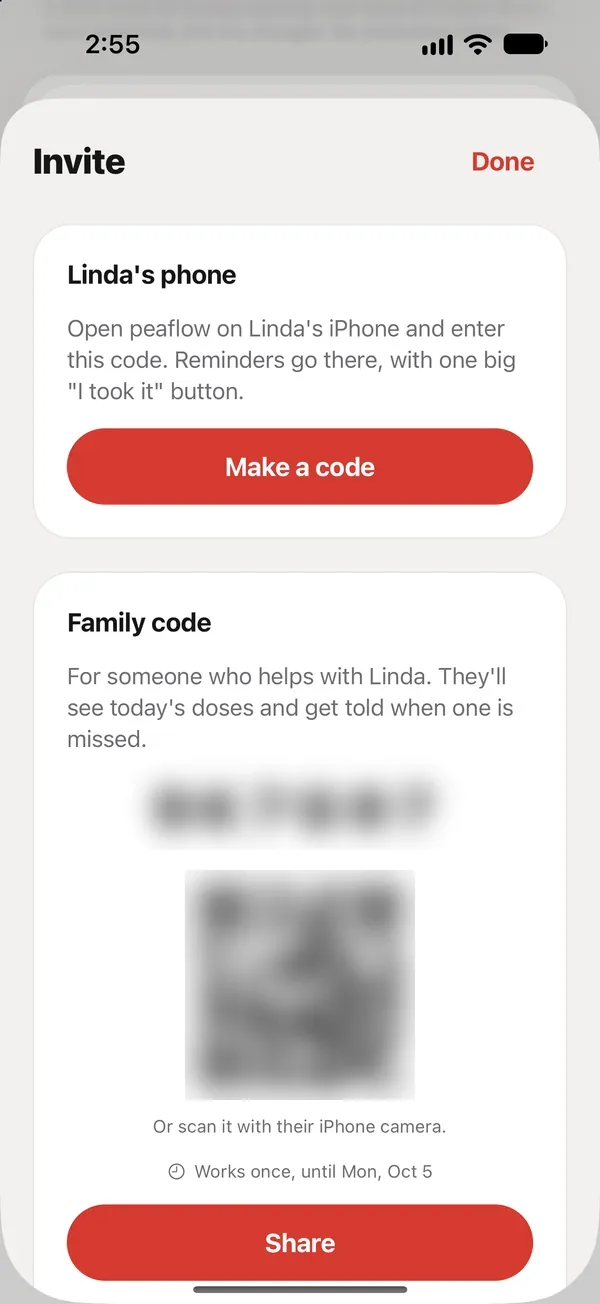
A code works once and expires after a few days. Make a new one any time.
What the family member does
- Download peaflow.
- On the first screen, tap I have an invite code and enter the code, or open the link you sent.
- Sign in, and they’re in.
They see Linda’s day, can mark doses, log readings and symptoms, and, with Plus, get missed-dose alerts.
How many people can join
| Free | Plus | |
|---|---|---|
| You (the owner) | ✓ | ✓ |
| Your parent’s own phone | ✓ | ✓ |
| Other family members | – | Unlimited |
Who’s in
Care → Who’s in lists everyone, with a role and when they were last active: Owner, Family, or Their phone. See Who can do what.
Did this answer your question?
Thanks for letting us know. If something's missing, email support@peaflow.com.