Sign in, passwords and sign-in links
Sign in with Apple, Google, an email link or an email and password, and set or change your password.
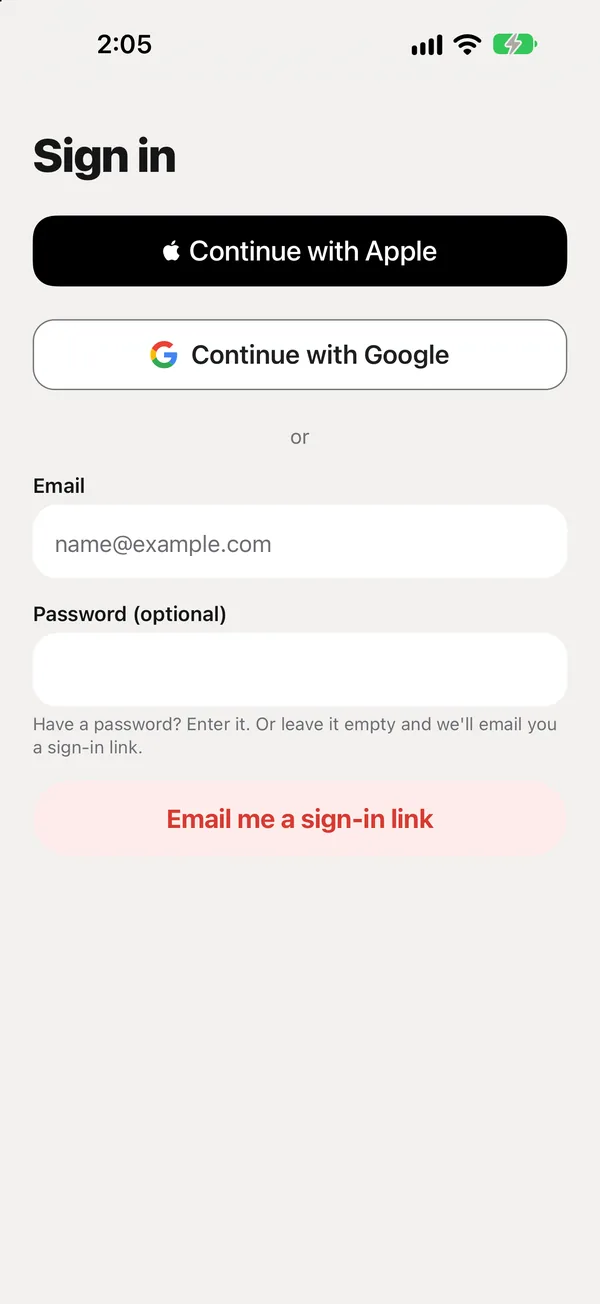
Ways to sign in
- Continue with Apple: the fastest. You can hide your email from us.
- Continue with Google
- Email: type your email, then either:
- leave Password empty and tap Email me a sign-in link, or
- type your password and tap Sign in.
New to peaflow with email?
Type your email and a new password (at least 8 characters) and tap Sign in. peaflow creates your account and signs you in.
Wrong password?
peaflow says “That password doesn’t match this account” and offers Email me a sign-in link instead.
Set or change your password
Open Settings → Password and type a new one (at least 8 characters). This works for any account with an email, including ones that started with Apple, Google or a link.
Forgot your password?
Use Email me a sign-in link, then set a new password in Settings → Password.
Sign-in links
A link works once and expires after 1 hour. Open it on the iPhone where peaflow is installed. See The sign-in link didn’t arrive.
Did this answer your question?
Thanks for letting us know. If something's missing, email support@peaflow.com.