Log blood pressure, blood sugar and other readings
Write down readings and symptoms for the family and the doctor. The health log is part of Plus.
On Today, tap Log blood pressure, sugar or symptoms. Anyone in the circle can log, and everyone sees it.
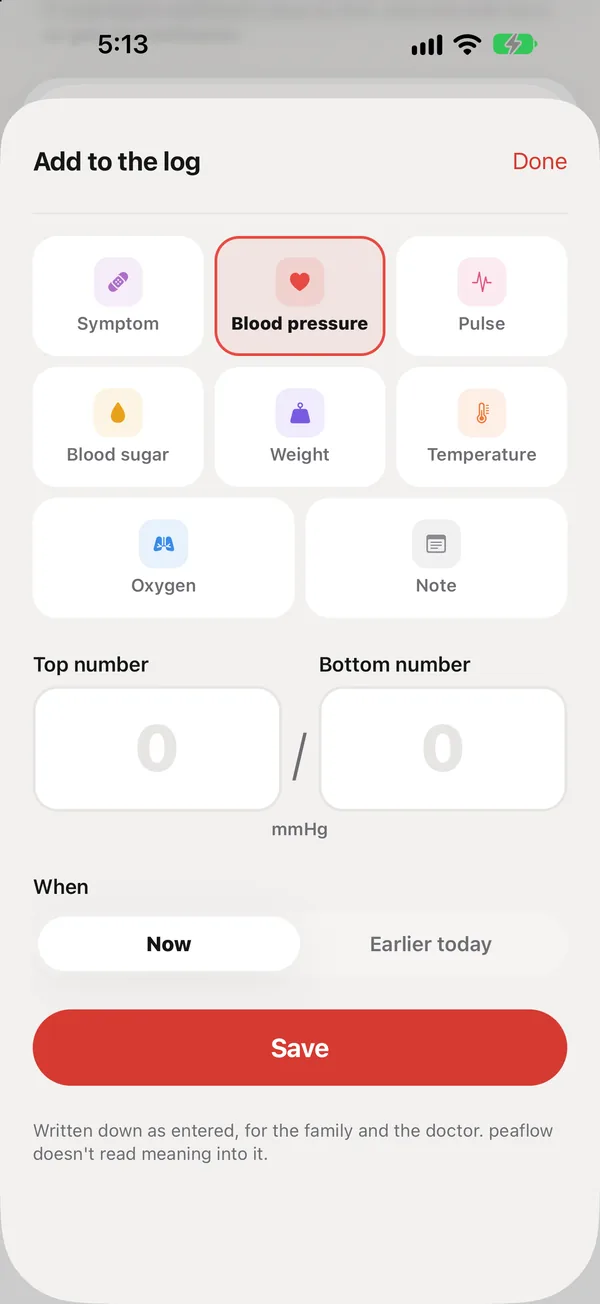
What you can log
| What you enter | |
|---|---|
| Blood pressure | Top and bottom number, in mmHg |
| Pulse | Beats per minute |
| Blood sugar | mg/dL, and optionally fasting, before a meal, after a meal or bedtime |
| Weight | lb or kg. peaflow also shows BMI; see BMI |
| Temperature | °F or °C |
| Oxygen | % |
| Symptom | Dizziness, nausea, headache, a fall and more, how strong, and a note |
| Note | Anything the doctor should hear |
How to log
- Tap the kind of reading.
- Type the number. The whole box is tappable, and the unit sits beside the number.
- Choose Now, or Earlier today and the time.
- Tap Save.
Units start with your iPhone’s region (kg and °C outside the U.S.) and switch with one tap.
Written down as entered
peaflow records readings exactly as you type them. It doesn’t label a reading high or normal, compare it to a range, or link it to a medication. peaflow only checks that the number could be real, so a typo like 1280/82 is caught.
Logging readings is part of peaflow Plus. Your parent’s phone can always send symptoms with How I feel.
Did this answer your question?
Thanks for letting us know. If something's missing, email support@peaflow.com.